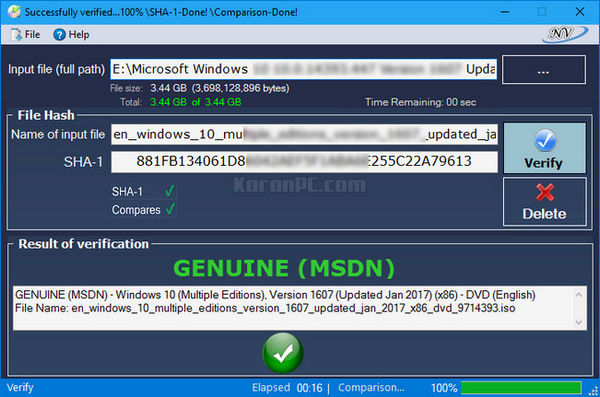
Looking for a simple way to verify the authenticity of your Windows or Office installation? Windows and Office Genuine ISO Verifier is here to help! This lightweight tool quickly checks whether your ISO files are genuine, ensuring you’re using legitimate software without hassle.
With its minimalistic design, Windows and Office Genuine ISO Verifier is perfect for users who want to avoid counterfeit software. Whether you’re setting up a new system or reinstalling Windows/Office, this tool provides peace of mind by confirming the integrity of your installation files.
Ready to verify your software? Download and install Windows and Office Genuine ISO Verifier today! Once you’ve tried it, let us know how the review matched your experience. Did we cover all the features you loved? If something was missing, share it in the comments below. Start ensuring your software’s authenticity now!
Features of Windows and Office Genuine ISO Verifier
Straightforward installation and intuitive interface
- Since the application comes in a portable package, the setup is a quick matter of decompressing the archive in the desired location on your hard disk. However, in case you are having a hard time accessing the file, then you should consider Unblocking the tool from Properties in the context menu.
- Even though it is not exactly eye candy, the interface is user-friendly and unlikely to cause you any real troubles while navigating. The UI is comprised of a single, medium-sized window that features very intuitive fields. Consequentially, functionality-wise, using the tool entails specifying the input file and the app does the rest of the job automatically.
It supports numerous versions and languages of Office and Windows
- The strong point of the program stems from the fact that it is designed to recognize a vast array of hashes that are associated with Microsoft’s operating system and Office bundle. To be more precise, the utility can compare file SHA-1 to relatively old Microsoft releases, such as Office 95 and Windows XP.
- On a side note, in case you already performed a scan for the file using other third-party software solutions, then you can add the SHA-1 in the dedicated field and determine the authenticity of the file on the spot. Then again, verifying an ISO file is not a lengthy process and should not take too much of your time.
A useful app that can spare you legal complications
- In the eventuality that you want to reinstall Windows or Office at work or home, but you do not know too much about the file you stumbled across, then perhaps Windows and Office Genuine ISO Verifier can help you determine if you have genuine copies of the software solutions.
Supported OS’s and Office (MSDN, VLSC…) – Includes x32, x64: (All languages)
- Windows 11
- Windows 10 – Version 1607 RS1 – MSDN (Updated Jan 19. 2017)
- Windows Server 2016 (x64) – Release Date: 12/01/2017
- Windows Server 2016 (x64)
- Windows 10 – Version 1607 RS1 – LTSB (Updated Jul 2016):
- Windows 10 – Version 1607 RS1 – VLSC (Updated Jul 2016):
- Windows 10 – Version 1607 RS1 – MSDN (Updated Jul 2016):
- Windows 10 – Version 1511 – VLSC (Updated Apr 2016):
- Windows 10 – Version 1511 – MSDN (Updated Apr 2016):
- Windows 10 – Version 1511 – MSDN (Updated Feb 2016):
- Windows 10 – Version 1511 – VLSC (Updated Feb 2016):
- Windows 10 – Version 1511
- Windows 10 – Version 1511 VL (VLSC)
- Windows 10
- Office 2016 RTM (MSDN) and VL (VLSC)
- Windows XP
- Windows Vista
- Windows 7
- Windows 8
- Windows 8.1
- Windows 8.1 with Update
- Office 2003
- Office 2007
- Office 2010 (MSDN) and VL (VLSC)
- Office 2013 (MSDN) and VL (VLSC)
- Office 2016
- Office 95
- Windows Advanced Server
- Windows Essential Business Server 2008
- Windows Home Server
- Windows Home Server 2011
- Windows Server 2003
- Windows Server 2003 R2
- Windows Server 2008
- Windows Server 2008 R2
- Windows Server 2012
- Windows Server 2012 Essentials
- Windows Server 2012 R2
- Windows Server 2012 R2 Essentials
- Windows Server 2012 R2 Essentials with Update
- Windows Server 2012 R2 with Update
- Windows Server Technical Preview
- Windows Small Business Server 2008
- Windows Small Business Server 2011
- Windows Storage Server 2008
- Windows Storage Server 2008 R2
- Windows Technical Preview
- Windows Thin PC
- Windows Server Technical Preview 2
Check out the best features of PowerDVD Ultra 19 for PC here.
Portable Windows and Office Genuine ISO Verifier
Take your verification tools on the go with Portable Windows and Office Genuine ISO Verifier! No installation required—run it directly from a USB or external drive. Perfect for IT professionals and users on the move, it offers all desktop features, letting you verify ISO files anytime, anywhere, without leaving traces on the host computer.
System Requirements
Microsoft .NET Framework 4.0 Client Profile
OS: Windows XP/ Vista/ Windows 7/ Windows 8/ Windows 8.1/ Windows 8.1 With update/ Windows 10/ Windows 10 – Version 1511 and 1607(x32, x64) / Windows 11.
Developer: Nebojsa Vucinic – Trebinje
License: Freeware
Language: English
OS: Windows
Download Windows and Office Genuine ISO Verifier for Windows
Windows and Office Genuine ISO Verifier 09.2026 | File Size: 15 MB
Pixeldrain | Direct