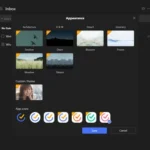
Tired of the default look of your Windows desktop? Stardock WindowBlinds empowers you to make your desktop interface uniquely yours! From the Start panel to the taskbar, window frames, and control buttons, WindowBlinds allows users to customize their desktop interface using themes called skins, enabling you to personalize the entire look and feel of your computer.
With Stardock WindowBlinds, the possibilities for customization are vast. Choose from a wide variety of pre-made skins or even create your own to match your personal style. Transform the appearance of your windows, buttons, scrollbars, and more, giving your desktop a fresh and personalized aesthetic. Express your individuality and make your computing experience truly your own with the powerful customization capabilities of WindowBlinds.
Ready to personalize your Windows desktop like never before? Download Stardock WindowBlinds today! Explore a world of customization and make your desktop truly unique.
Features of Stardock WindowBlinds Full
Visual Styles
Select from the many skins included with WindowBlinds or choose from thousands of skins available for download at WinCustomize.com
Alternative Skins
Some skins have multiple sub-styles that can be applied to suit your personal tastes. You can also save your style combinations as presets for quick access later.
Customize
Modify Skins
Personalize any of the default Windows themes or any skins downloaded from WinCustomize.com
Fonts
Easily change which fonts your skins use.
Transparency
Make your skins the center of attention or allow them to blend into your backgrounds.
Colors
Find a great skin, but want to change the color scheme? WindowBlinds enables instant color changes from its configuration menu.
Textures
Personalize any skin by applying one of the textures included with WindowBlinds or use one of your own creations.
Explorer Backgrounds
Tired of looking at those boring white explorer windows? Customize them with unique explorer backgrounds.
Apply
Easy set-up
We have simplified the configuration menu to make personalizing your desktop quick and intuitive. Instantly preview your selections and adjustments before you apply them to your desktop.
Presets
Any changes and adjustments you make to a skin can be saved as a preset. Presets enable you to access previous customizations and apply them to a skin quickly.
Randomized Skins
WindowBlinds enables you to change skins randomly at timed intervals. Your desktop will never be boring again when you are treated to a new skin every time you logon.
Per application skinning
Choose skins for each of your application types. For example, WindowBlinds enables your word processing software to use a different skin than your design programs.
Design your own skins
Each purchase includes SkinStudio, the powerful companion application for WindowBlinds that enables you to create your own skins. Edit controls, start menu, taskbars, explorer windows, fonts, colors backgrounds and more with SkinStudio.
Easy to use
Customize only the parts of the Windows interface you want to change and SkinStudio will do the rest. This makes it easy for inexperienced users to create a great skin quickly. Advanced users can still enjoy designing every aspect of the Windows interface.
See how XWidget Pro stands out in our full review.
Developer: Stardock Corporation
License: full_version
Language: English
OS: Windows 10, 11.
Download Stardock Windowblinds for Windows
Stardock Windowblinds 11.07 | 64-bit | File Size: 129 MB
UsersDrive | NextCloud | Direct
Stardock Windowblinds 10.89 | 64-bit | File Size: 48 MB
UsersDrive | Direct