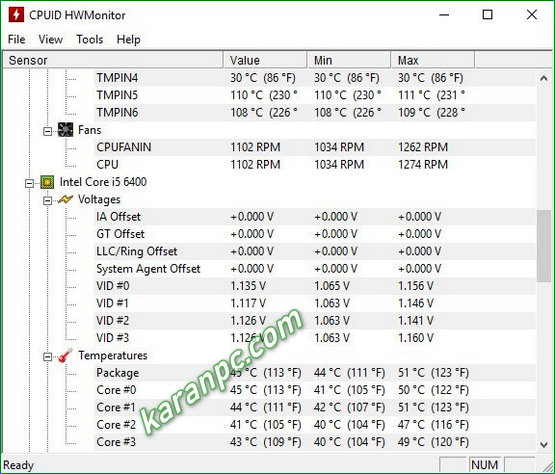
Ensure your PC is running smoothly and avoid potential hardware failures with CPUID HWMonitor! This powerful hardware monitoring program reads your PC system’s main health sensors, including voltages, temperatures, and fan speeds.
CPUID HWMonitor handles common sensor chips like ITE IT87 series, Winbond ICs, and others. It also reads on-die core thermal sensors for modern CPUs, hard drive temperatures via S.M.A.R.T., and video card GPU temperatures. Select hardware monitors like abit uGuru and Gigabyte ODIN power supplies are also supported.
CPUID HWMonitor Pro offers advanced features like remote monitoring, graph generation, and improved interface customization.
Whether you need basic monitoring or advanced insights, download CPUID HWMonitor (Free or Pro) today! Keep tabs on your system’s vital signs and prevent overheating or other hardware issues.
Want to know CPU-Z’s features? Check out the guide.
Features of CPUID HWMonitor Free
One special feature that makes the application to get outside the box is the ability to add monitored values to the system tray, which can be performed from the right-click menu. Therefore, each time a value will change, you will surely get notified. What’s more interesting about HWMonitor Pro is that you can easily connect to a specific IP address or another network through a simple TCP / IP connection, so you can watch the sensors of one or several distant computers.
HWMonitor Pro comes with a user-friendly interface and enables you to automatically create graphs for each logged session and save them as bitmap files, as well as to save the monitoring and the SMBus data. The application handles the most common sensor chips and tracks only the components that have compatible sensors, depending on your brand and model of motherboard, processor, keyboard etc. In addition, it can read modern CPU core thermal sensors and access the main health sensors on your system.
HWMonitor PRO Features
HWMonitor PRO adds the following features :
- Remote Monitoring:
Watch the sensors of one or several distant PCs or Android devices using a simple TCP/IP connection. - Graph Generator:
Save monitoring data and generate logging graphs as bitmap files. - Improved Interface:
Sensors in system tray, editable sensors labels…
Developer: Homepage
License: full_version / Freeware
Language: English
OS: Windows
Download CPUID HWMonitor Pro for Windows
CPUID HWMonitor Free 1.66 + Portable | 32/64 bit | File Size: 6 MB
Pixeldrain | Direct
CPUID HWMonitor Pro 1.59 | 64-bit | File Size: 4 MB
UsersDrive | Direct
Portable CPUID HWMonitor Pro 1.59 | 64-bit | File Size: 2 MB
UsersDrive | Direct
CPUID HWMonitor Pro 1.47 + Portable | 32-bit | File Size: 3 MB
Direct