Repetitive tasks drain your productivity. Clicking through the same steps, filling the same forms, moving the same files-every day. AutomationX Studio puts an end to that. It’s an offline automation studio for Windows. Build visual automation flows without coding. Define variables and reusable steps to create powerful, repeatable workflows. Every flow and value stays on‑device—no cloud sync, no accounts, no privacy concerns. Your data never leaves your machine. From simple file operations to complex multi‑step sequences, AutomationX Studio handles it all locally. Take control of your workflow, eliminate manual errors, and reclaim hours of your time. Automate once. Run anytime. Zero subscriptions.
Features of AutomationX Studio
AutomationX Studio isn’t just a task runner. It’s a full offline automation engine built for anyone who wants their PC to handle repetitive work – without a subscription, an account, or a single byte leaving the machine.
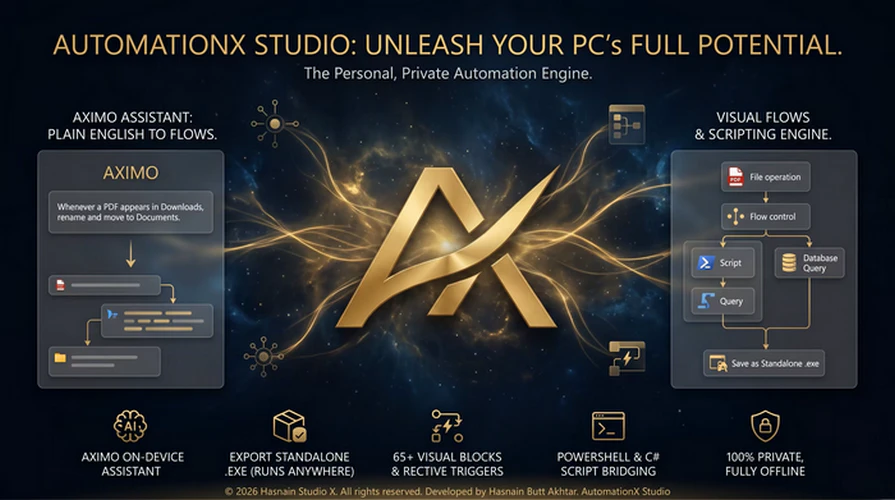
Snap together visual blocks – window and process control, file operations, desktop automation, LAN networking, conditions, loops, parallel branches, error handling, scripts, and a local database – into a flow, press Run, and watch every step play out in a live log. Or just tell Aximo, the built‑in assistant, what you want in plain words and watch it build the flow for you. When it works, export it as a single standalone .exe that runs on any Windows PC with nothing installed. Everything runs locally, so your automations keep working with no internet, no cloud, and no strings.
Why People Choose AutomationX Studio
- Aximo, a built‑in assistant that turns plain-English requests into working flows, fully on-device
- 65+ automation blocks across System, Files, Desktop, Network, Logic, Data, Script, and Flow
- Real scripting inside your flows – PowerShell and C#, with variables bridged both ways
- Export a single standalone .exe with the runtime bundled – no install on the target PC
- Reactive triggers – folder changes, processes, CPU/battery level, hotkeys, webhooks, and more
- A visual builder with conditions, loops, parallel branches, try/catch, and subflows
- Local database, JSON store, cache, and global variables
- Runs fully offline with no telemetry
Learn more about Autorun Organizer’s features in our guide.
Meet Aximo
Press Ask Aximo, type your automation in plain words – “whenever a PDF appears in Downloads, rename it with today’s date and move it to Documents” – and Aximo understands, builds the visual flow, sets the variables, adds the trigger, checks it, and saves it. All on-device, no cloud, no account.
A Real Engine, Not Just Buttons
Mix visual blocks with PowerShell and C# scripts. Branch with conditions, run steps in parallel, wrap risky steps in try/catch, and call one flow from another. Drive desktop apps with UI automation, read text off the screen with on-device OCR, and find an image and click it.
Standalone Bots
Turn any flow into a single .exe that bundles the entire runtime, or a clean PowerShell bot, or a portable pack. Drop it on a machine that has never seen AutomationX Studio – it just runs. Optionally sign your bots with your own certificate.
System Requirements
– OS: Windows 10 version 19041.0 or higher
– DirectX: Version 11 (Minimum), DirectX 12 API, Hardware Feature Level 12 (Recommended)
– Memory: 8 GB (Minimum), 16 GB (Recommended)
– Processor: Quad Core Processor X64 (Minimum), Octa Core Processor X64 Or Better (Recommended)
Developer: Homepage
Platform: Windows
License: full_version
Language: English
Download AutomationX Studio for Windows
AutomationX Studio 1.0.0 | 64-bit | File Size: 242 MB
UsersDrive | Direct
Portable AutomationX Studio 1.0.0 | 64-bit | File Size: 231 MB
UsersDrive | Direct