Do you frequently capture and edit screenshots? Then you know the limitations of the “Print Screen” button and basic tools like Windows Paint. PicPick Professional emerges as a full-featured screen-capturing solution that not only enables you to take pictures of the screen or a certain area but also to edit the screenshots on the spot.
For those who take screenshotting seriously, PicPick Professional offers dedicated tools that deliver professional results. Capture anything from full screens to specific regions, and then use its built-in editor to annotate, highlight, or modify your images instantly. Download PicPick Professional today and transform your screen-capturing workflow!
Have you used PicPick Professional? Share your experience in the comments. Did we cover all the features you found useful, or is there something we missed? Let us know!
Features of PicPick Professional Full
Screen Capture:
- Auto-scroll, dual monitors, and sound effects are supported
- Various output to File, Printer, Office programs, External program
- Sharing to FTP, Web, E-mail, Facebook, and Twitter is supported as well
- Full Screen
- Active Window
- Window Control
- Scrolling Window
- Region, Fixed Region
- Freehand
- Repeat Last Capture
Image Editor:
- Intuitive User Interface
- Windows 7 Ribbon-style
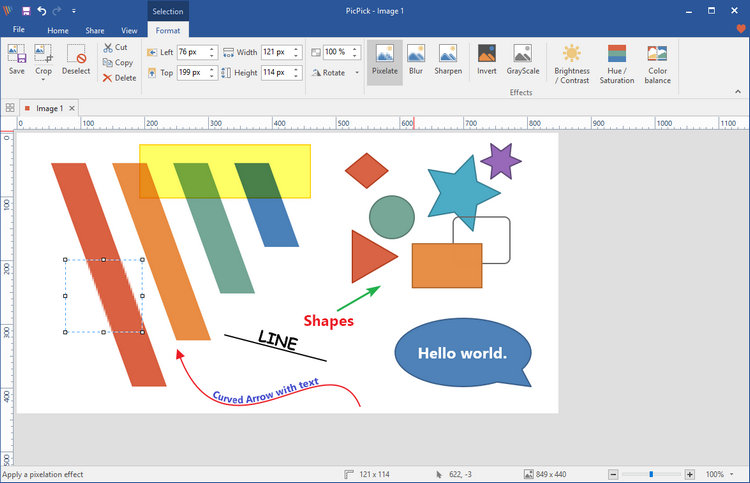
- Standard drawing, shapes, arrows, lines, text, etc.
- Blur, sharpen, hue, contrast, brightness, pixelate, rotate, flip, frame effect, etc.
Color Picker and Color Palette:
- various color code types (RGB, HTML, C++, Delphi)
- Photoshop style RGB/HSV conversion is supported.
- Pick and Save your favorite color!
Screen Pixel Ruler:
- horizontal and vertical orientation
- various units (Pixels, Inches, Centimeters)
- DPI setting (72, 96, 120, 300)
- colorful gradient skins
- You don’t have to install any other screen ruler software.
Screen Magnifier:
- Zoom 2x to 10x option
- Stay on top, smooth display, and sizable window
Screen Protractor:
- Have you seen any screen protractor functions?
Screen Crosshair:
- For aligning objects in graphics or design applications
- For calculating relative coordinates on the screen
Whiteboard:
- For giving a presentation or just drawing something on screen
Benefits of PicPick Pro Portable Edition
The portable version of PicPick Pro is perfect for users who want to use the software without installing it on their computer. You can simply carry the portable file on a USB flash drive and run it on any Windows PC instantly. It does not modify your Windows registry or leave any leftover files, keeping your system clean and optimized.
What's New in PicPick Professional 7.6.0 - Changelog
- Added specific monitor capture — users can now choose a specific display from a dropdown.
- Improved the color theme selector in the image editor.
- Added drawing tools to the Quick Access Toolbar.
- Added a Reflection effect.
- Enhanced the Text tool with resizable text boxes and accurate font previews.
- Text now keeps its own color instead of unexpectedly inheriting the shape outline color.
- Reopen closed screenshots from the tab context menu or with Ctrl+Shift+T.
- Added a color picker to the color buttons.
- Faster image switching with Ctrl+1–9.
- Fixed an issue with Ctrl+Tab navigation.
- When saving images automatically, deleted or renamed file numbers are no longer reused.
- Added an option to save all images as a single PDF.
- Other minor bug fixes.
Developer: Homepage
License: full_version
Language: Multilingual
OS: Windows
Download PicPick Pro for Windows
PicPick Professional 7.6.0 | File Size: 79 MB
UsersDrive | Direct
Portable PicPick Professional 7.6.0 | File Size: 64 MB
UsersDrive | Direct