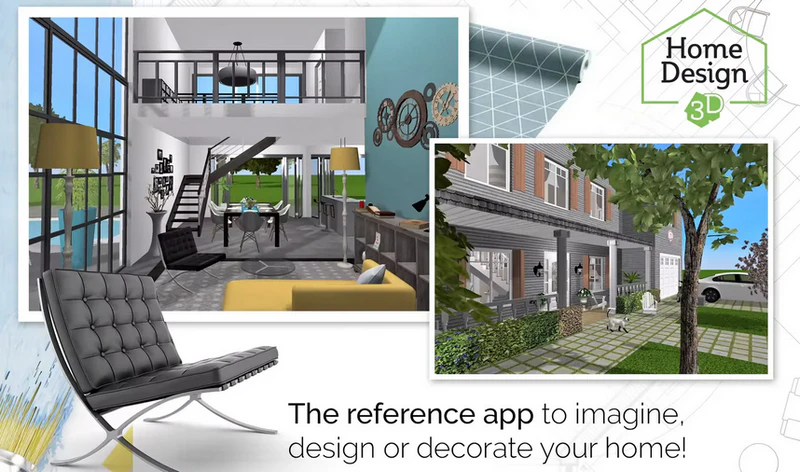
Want to design and remodel your house in 3D with a quick and intuitive tool? Home Design 3D lets you do just that! Create, design, furnish, and decorate your home easily and share it with a community of more than 90 million users worldwide!
With Home Design 3D, creating the home of your dreams is just a few steps away! Visualize your projects, from decoration ideas to remodeling and interior/exterior arrangements. Unleash your creativity, imagine your projects, and design your own house plans!
Stop dreaming and start designing! Download Home Design 3D today and experience the ease and power of creating your dream home in 3D!
Want to know Uninstall Tool 2025’s features? Check out the guide.
Features of Home Design 3D
DESIGN YOUR FLOORPLAN
– In 2D and 3D, draw your land, rooms, dividers
– Change the height or the thickness of the walls, create corners
– Add doors and windows with fully-resizable pieces of joinery
FURNISH AND DECORATE
– Design and decorate both the interior and outdoor of your home
– Make your choice from 1600+ pieces of furniture and accessories, customize your decoration and express your style, from the most classical to the trendiest!
– Edit any object, by changing its size, color, position and altitude on the walls
– Duplicate your favorite items thanks to the copy/paste function
– Use the undo/redo feature at anytime if you want to go back
– Use the eye dropper to find an existing color in the plan
– You can also import picture as texture and apply them everywhere
VISUALIZE AND VISIT YOUR CREATION
– Visit your creation in real-time 3D as if you were inside it thanks to our brand new photo-realistic 3D rendering
– Discover your home, your outdoor and even your neighborhood
– Admire the result day and night, the compass function will show you where exactly the light will fall at different times of the day
IMPORT/EXPORT AND SHARE
– Import any plan and display it on the background of the project
– Export and continue your projects on your other devices thanks to the cross-platform compatibility
– Share your projects via e-mail, Dropbox, OneDrive and many more file hosting services!
– Share your best creations with the Home Design 3D community
Portable Home Design 3D
Design your home on the go. The software can also be used from a USB. Edit and create from any compatible PC, ensuring your projects are always ready, wherever you are.
System Requirements
– OS: Windows 10 version 16299.0 or higher
– Memory: 2 GB (Minimum), 8 GB (Recommended)
– DirectX: Version 11
– Memory: 6 GB (Minimum)
– Video Memory: 1 GB (Minimum), 4 GB (Recommended)
– Processor: Intel® Core™ 4th generation or higher / AMD Ryzen™ (Minimum), Intel® Core™ 2 Duo (2,00 GHz) / AMD Phenom™ (2,00 GHz) (Recommended)
* No internet connection required
* Illustrated and video tutorial available
Developer: Homepage
Platform: Windows
License: full_version
Language: English
Download Home Design 3D for Windows
Home Design 3D 5.1.727 | File Size: 416 MB
UsersDrive | NextCloud | Direct
Portable Home Design 3D 5.1.727 | File Size: 404 MB
UsersDrive | NextCloud | Direct