I’ve probably spent more time flying over digital mountains and city grids than is entirely healthy, and through all that, Google Earth Pro is still the program I come back to on Windows. It’s my go-to for planning a weekend hike or just satisfying my curiosity about what a place halfway across the world really looks like. The jump from a global view down to seeing individual trees and cars never gets old. I ran it on my Windows 11 machine last week, and it handled that zoom perfectly—no stuttering or lag. While it’s fantastic for casual exploring, don’t underestimate it; I’ve seen professionals in real estate and urban planning rely on its precision for site analysis and presentations.
Key Features of Google Earth Pro
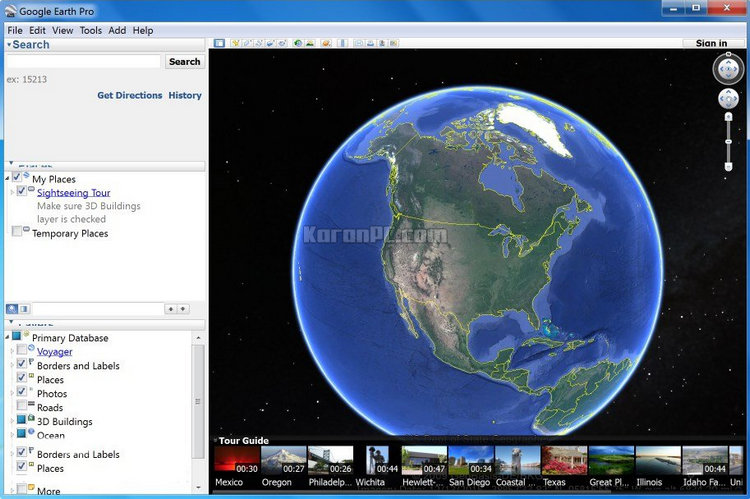
- Sophisticated Streaming: High-resolution terrain and imagery load on the fly as you pan and zoom, so you’re not waiting for giant files to download.
- Advanced Local Search: Find specific addresses, businesses, or landmarks, and see them pinned directly on the 3D globe alongside driving directions.
- Rich Information Layers: Toggle on layers for roads, borders, 3D buildings, and points of interest like parks, schools, and hospitals to add context.
- Professional Annotations: Draw lines to measure distances, create polygons to mark areas, and add placemarks to build custom maps for projects.
- Spreadsheet Integration: Import a massive list of up to 2,500 locations at once from a CSV file using coordinates or street addresses.
- KML Data Exchange: Save and share all your custom annotations and layers using KML, the standard format for geographic data.
Read our Google Maps Downloader Tool review and discover its features.
System Requirements for Windows
- Operating System: Windows 7 or higher (Windows 10 and 11 recommended). Note: Windows 7 is no longer supported by Microsoft, so use on this OS is at your own risk.
- CPU: 2GHz dual-core processor or faster.
- System Memory (RAM): 4GB or more.
- Hard Disk: At least 4GB of free space for installation and cache.
- Graphics: A video card that supports DirectX 9 or OpenGL 2.0.
Why I Recommend Google Earth Pro
If you want a genuine, detailed 3D view of our planet, I’d suggest you download Google Earth Pro for Windows 10 or 11. The Google Earth Pro system requirements for Windows 11 are so modest that it runs without a hitch on nearly any computer from the last decade. A common question I see is how to install Google Earth Pro on a PC safely—just grab the installer directly from Google’s site to avoid any bundled junk. Getting the free Google Earth Pro for Windows desktop is a no-brainer; you unlock pro-level features like creating narrated movie flyovers and printing high-resolution images, which were previously part of a paid subscription. It’s one of those tools that feels both incredibly powerful and surprisingly accessible.
Benefits of Google Earth Pro Portable Edition
The Portable Edition is a game-saver if you’re not always at the same desk. You can run the entire program from a USB drive, which means all your saved places, routes, and custom KML files travel with you. I find this perfect for consultants or teachers who hop between different Windows computers; you just plug in your drive and your entire geographic workspace is ready. It also sidesteps the need for admin rights to install software, which is ideal for locked-down corporate or library computers where you can’t modify the main system.
Developer: Homepage
License: Freeware
Language: Multilingual
OS: Windows
Download Google Earth Pro Offline Installer for Windows
Google Earth Pro 7.3.7.1327 | 32-bit | File Size: 71 MB
UsersDrive | Direct
Google Earth Pro 7.3.7.1327 | 64-bit | File Size: 91 MB
UsersDrive | Direct
Portable Google Earth 7.3.7.1327 | 64-bit | File Size: 64 MB
UsersDrive | Direct