FlexClip is a powerful online tool for creating videos easily and quickly. From marketing content to family memories, it lets users build videos in just a few clicks. This browser-based platform works on Chrome, Safari, Firefox, and other popular browsers, so you don’t need to download any software. Its simple design and impressive range of features make it perfect for beginners and professionals alike. In this article, we’ll take a close look at what FlexClip offers and how it can help you create amazing videos.
Key Features of FlexClip
1. Thousands of Templates and Free Media Resources
FlexClip provides a massive collection of templates that cover various categories. Whether you’re creating a business promo, slideshow, or social media content, there’s a template to get you started. You can also access free images, video clips, and music to add to your projects, saving time and helping your videos stand out.
2. Easy-to-Use Platform
One of FlexClip’s main attractions is its user-friendly design. Even with no editing experience, you can quickly learn how to create videos. The tools and features are intuitive, making it easy to arrange clips, add text, and insert effects. Everything is online, so you can start and edit your projects from anywhere.
3. Screen and Webcam Recorder
FlexClip includes built-in screen and webcam recording. This is perfect for creating tutorials, presentations, or reaction videos. You can capture your screen and even your webcam simultaneously, then edit the footage within the same platform.
4. AI-Powered Tools
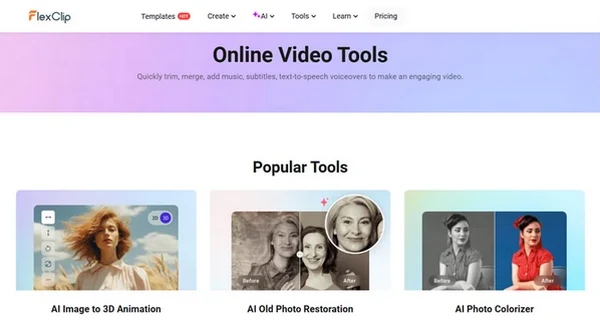
FlexClip has a wide range of AI-powered tools that make it stand out from other video makers. Here are some highlights:
- Text to Video: Convert your ideas into videos just by describing them.
- Text to Speech: Turn written text into natural-sounding voiceovers.
- Video Script Generator: Automatically create video scripts with AI, saving time on planning.
- Image Generators: Use text to create images or enhance existing images with tools like colorization, restoration, and upscaling.
- Vocal and Noise Remover: Remove unwanted background noise or separate vocals from a song for clean audio.
These AI features make FlexClip a powerful choice for those who want to add a professional touch to their videos.
5. Team Collaboration
For businesses, FlexClip has a team collaboration feature that lets multiple users work together on video projects. This is especially useful for marketing teams who need to review, edit, or approve videos together.
6. Background Removal
With FlexClip, you can remove backgrounds from images or videos without needing to install complex software. This is helpful for creating product showcases or when you want to change the background of a video without a green screen.
7. Auto Subtitles and Video Translator
FlexClip’s AI auto subtitle generator adds captions to your videos automatically. This is a valuable feature for accessibility and makes it easier for viewers to follow along, especially on social media. The video translator also helps you reach a global audience by translating subtitles to different languages.
Additional Editing Tools
Aside from its main features, FlexClip offers a wide selection of basic and advanced editing tools. Some of the most useful ones include:
- Chroma Key Editor: Replace video backgrounds with ease using the chroma key (green screen) feature.
- Speed Curve: Speed up or slow down video clips with smooth transitions.
- 4K Video Editor: FlexClip supports high-quality 4K editing, ensuring your videos look clear and professional.
- GIF Maker: Turn any video or image into a GIF, perfect for social media and messaging.
- Meme Maker: Create memes quickly with just a few clicks.
- Trim, Cut, and Compress: Easily trim videos to the desired length, cut unwanted parts, and compress files to make them easier to share online.
FlexClip also includes tools for adding music, captions, and text to videos, giving you complete control over your projects.
View All Tool
What’s New in FlexClip AI
AI Recreate
AI Recreate lets you turn files into a finished video almost instantly. Choose from thousands of polished templates and upload your clips and images — the AI analyzes your media, selects the best shots, aligns them to the chosen template’s pacing, and generates fitting captions and transitions to produce a complete draft in seconds. It’s perfect when you’ve got no time, no ideas, or limited editing skills: after the AI builds the draft you can quickly fine-tune text, timing, and effects in the editor and export in up to 4K.
Auto Edit
Auto Edit focuses on raw footage: drop in your videos and photos and let FlexClip’s AI do the heavy lifting. The tool automatically scans each file, identifies highlight moments, trims and stitches clips into a coherent sequence, and adds context-aware text or captions that strengthen the narrative. The result is a ready-to-share video you can publish immediately or tweak further—ideal for travel reels, event montages, vlogs, and product clips where speed matters but quality can’t be compromised.
Why Choose FlexClip?
FlexClip is ideal for people who want to create videos without the hassle of learning complex software. Its AI features simplify the creative process, making it possible to create professional-looking videos quickly. The vast template library and free resources are especially valuable for those who need quick, quality content for marketing or social media. Plus, the team collaboration feature allows for seamless teamwork on projects.
FlexClip’s browser-based setup is also a huge advantage. You don’t need to worry about compatibility or storage space on your computer. All you need is an internet connection, and you’re ready to go.
How to Get Started with FlexClip
- Visit FlexClip’s website: Just open FlexClip.com in your browser to start creating. There’s no software to install.
- Choose a Template or Start from Scratch: Pick a template that suits your project or start with a blank canvas.
- Add Media: Use FlexClip’s free media resources or upload your own images, clips, and music.
- Edit and Customize: Adjust the colors, fonts, and styles to match your brand or personal taste. Add effects, transitions, and music.
- Export and Share: Once you’re done, export your video and share it on social media, websites, or anywhere else you want to showcase your work.
Conclusion
FlexClip continues to stand out as an impressive and accessible video creation platform, and its new AI Recreate and Auto Edit features take that convenience even further. Along with its simple interface, rich media library, and existing AI tools, these new additions make it possible for anyone—regardless of editing experience—to create polished, professional videos in minutes. Whether you’re a business owner crafting marketing content or a parent preserving family memories, FlexClip now gives you even more power to turn ideas into high-quality results with minimal effort.
If you’re searching for an online video editor that’s fast, intelligent, and easy to use, FlexClip remains an excellent choice. Explore FlexClip and experience its new AI capabilities as you create your next video masterpiece today!