I often find myself dealing with various PDF documents for both work and personal projects. Sometimes I need to combine multiple reports into a single file, other times I have to extract specific pages from a large manual, or even convert a PDF into a Word document for editing. This is where a reliable PDF utility becomes essential. After trying out several options, I’ve found that All About PDF Advanced offers a comprehensive and user-friendly solution for all my PDF needs. It’s a versatile tool that handles everything from basic edits to advanced security features, all from my desktop.
Key Features of All About PDF Advanced Edition
- Privacy Focused: All your PDF files are processed locally on your desktop, so you never have to upload sensitive documents to someone else’s server.
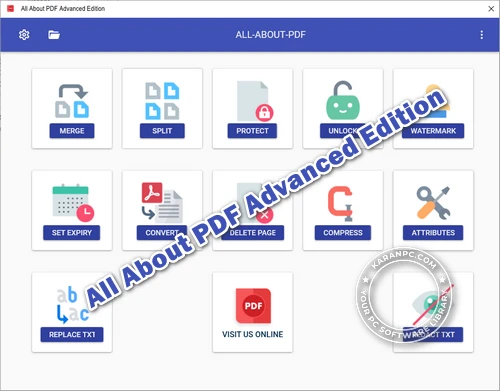
- PDF Conversion: Convert batches of PDFs into other formats, including Microsoft Word, PowerPoint, JPG images, and HTML.
- Fast PDF Processing: Its 64-bit design uses multiple CPU cores, which makes working with PDFs much faster.
- Merge or Split PDF Files: Combine several PDFs into one, or split a large file into smaller ones by page range or at fixed intervals.
- Protect PDF Files: Add Owner and User passwords with 256-bit encryption to control permissions like printing, copying, or editing.
- Compress PDF Files: Shrink large PDFs, especially scanned ones, by compressing images and removing extra data—I’ve seen files get much smaller.
System Requirements for Windows
- Operating System: Windows 11, Windows 10 (64-bit)
- Processor: x64 compatible processor (Intel or AMD), 1.5 GHz or faster
- RAM: 8 GB minimum (16 GB recommended for optimal performance)
- Disk Space: 200 MB free disk space for the .exe installer
- File Format: .exe installer; Portable .zip edition also available
See how Yamicsoft Windows Manager 2025 stands out in our full review.
Why I Recommend All About PDF Advanced Edition
For anyone who regularly works with PDF documents, I genuinely believe this software is a fantastic choice. The array of functions it provides, from merging and splitting to security options, covers just about every scenario I encounter. If you’re wondering what All About PDF Advanced Edition does, it handles managing, securing, and converting your PDFs. The interface is clean and easy to navigate. Whether you need it for personal use or professional tasks, you’ll appreciate its speed and reliability. I find its features to be particularly strong, especially the compression and conversion, which have saved me a lot of time. Plus, getting it set up on Windows is straightforward, even if you’re not very technical.
Benefits of All About PDF Advanced Edition Portable Edition
One of the best advantages of the Portable Edition is its flexibility. With the portable version, there’s no installation needed. You can run it directly from a USB drive or any portable storage. This means you can use it on any Windows PC without leaving registry entries or temporary files behind, which keeps other systems clean. It’s great for people who work on multiple computers, shared workstations, or systems where you can’t install software, keeping your PDF tools with you.
Developer: Homepage
Platform: Windows
License: full_version
Language: English
Download All About PDF Advanced Edition for Windows
If you’re looking for a powerful and versatile PDF utility to handle all your document management needs, All About PDF Advanced Edition is an excellent choice. It offers robust features, speed, and privacy, all in one package. Click the link below to download.
All About PDF Advanced Edition 3.2040 | File Size: 381 MB
UsersDrive | Direct
Portable All About PDF Advanced Edition 3.2034 | File Size: 285 MB
UsersDrive | Direct