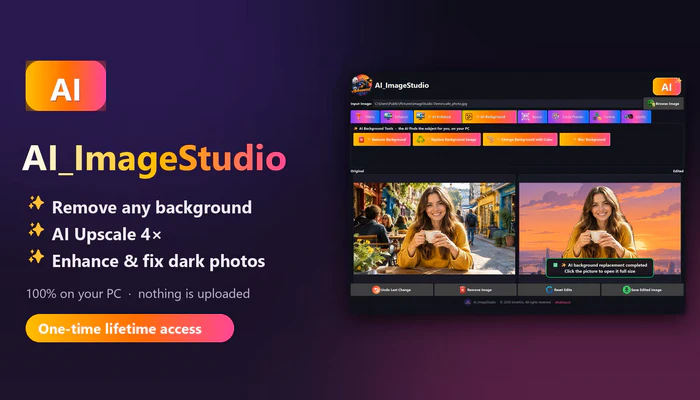
Relying on online image editors slows you down and risks your privacy. AI ImageStudio is the all-in-one desktop solution. It enhances, edits, and transforms images with speed and precision. Clean up backgrounds, apply intelligent enhancement filters, resize for any platform, and convert formats—all in one unified workspace. Create crisp icons and social-media-ready graphics without uploading to the cloud. Everything runs locally for maximum performance, privacy, and reliability. With instant previews and drag-and-drop simplicity, you get professional results offline. No subscriptions. No data leaks. Just fast, secure editing on your own device. AI ImageStudio gives you complete control over your visuals.
Features of AI ImageStudio
Background Editing Suite
Remove backgrounds instantly, replace them with any image, apply solid color fills, or add soft‑to‑strong blur for a professional look.
Image Enhancement Tools
Improve photos instantly with Auto Enhance, Noise Reduction, Auto White Balance, and Smart Sharpen
Image Filters
Adjust brightness, contrast, vibrance, sharpness, and warm/cool tones with easy sliders.
Manual Resize
Resize images to any custom width and height.
Social Media Presets
Instantly resize images for Instagram, Facebook, YouTube, and LinkedIn.
Image Format Cinversion
Convert images in PNG, JPEG, or BMP formats.
Icon Generator
Create Windows .ICO files in multiple standard sizes.
Drag & Drop Support
Quickly load images by dragging them into the app
Side‑by‑Side Preview
Compare original and edited images at the same time.
AI Background Remover
ONE click, and the AI finds the subject for you. People, pets and products are cut out cleanly, even around hair. No manual selecting, no brushes, no skills needed.
AI Background Colour
Drop your subject onto any solid colour. Perfect for profile pictures, ID-style photos and presentations.
AI Background Replace
Put yourself on a beach, in a city at sunset, or anywhere you like. The new background fills the frame perfectly, never stretched.
AI Portrait Blur
Get the professional “DSLR” look. Your subject stays sharp while the background melts into a soft, beautiful blur.
AI Product Photos
Turn messy table shots into clean white-background product images for your online shop, eBay, Etsy or Amazon listings in seconds.
AI Upscale 2× and 4×
Make small, low-resolution photos BIG and SHARP. Real AI detail, not blurry stretching. Choose “Fast” or “Best quality” mode.
Get a quick overview of Universal Maps Downloader’s features here.
System Requirements
Windows 10 version 17763.0 or higher (64-bit)
Developer: Homepage
License: full_version
Language: English
OS: Windows
– Faster AI Background tools: remove, recolour, replace or blur, and try several backgrounds instantly
– NEW: Smart Low-light Fix and Strong Denoise
– AI features now highlighted in gold for quick spot
Download AI ImageStudio for Windows
AI ImageStudio 1.0.5 | 64-bit | File Size: 265 MB
UsersDrive | Direct
Portable AI ImageStudio 1.0.5 | 64-bit | File Size: 221 MB
UsersDrive | Direct